Every Thing on Android..!! reviews on new, interesting and use full apps ;) :D

Saturday, 1 November 2014

Watch this: Samsung Galaxy S5 running leaked Android 5.0 Lollipop build

When Google showed off Android 5.0 Lollipop’s new Material Design aesthetic during this year’s Google I/O, the first thing we thought about was how this would translate to the custom skins offered by OEMs like HTC and Samsung. Just before we kick off the weekend, the boys at SamMobile are quenching a little bit of this curiosity with an early look at Android 5.0 Lollipop running on the Samsung Galaxy S5.
This is actually the second time they’re showing off Samsung’s version of Lollipop, although this one is much more recent build. Although it’s still an early version of the software Samsung will eventually roll out to their Galaxy line, it clues us in on exactly what the OEM has in mind for their version of Google’s Material Design UI and really, it’s not half bad.
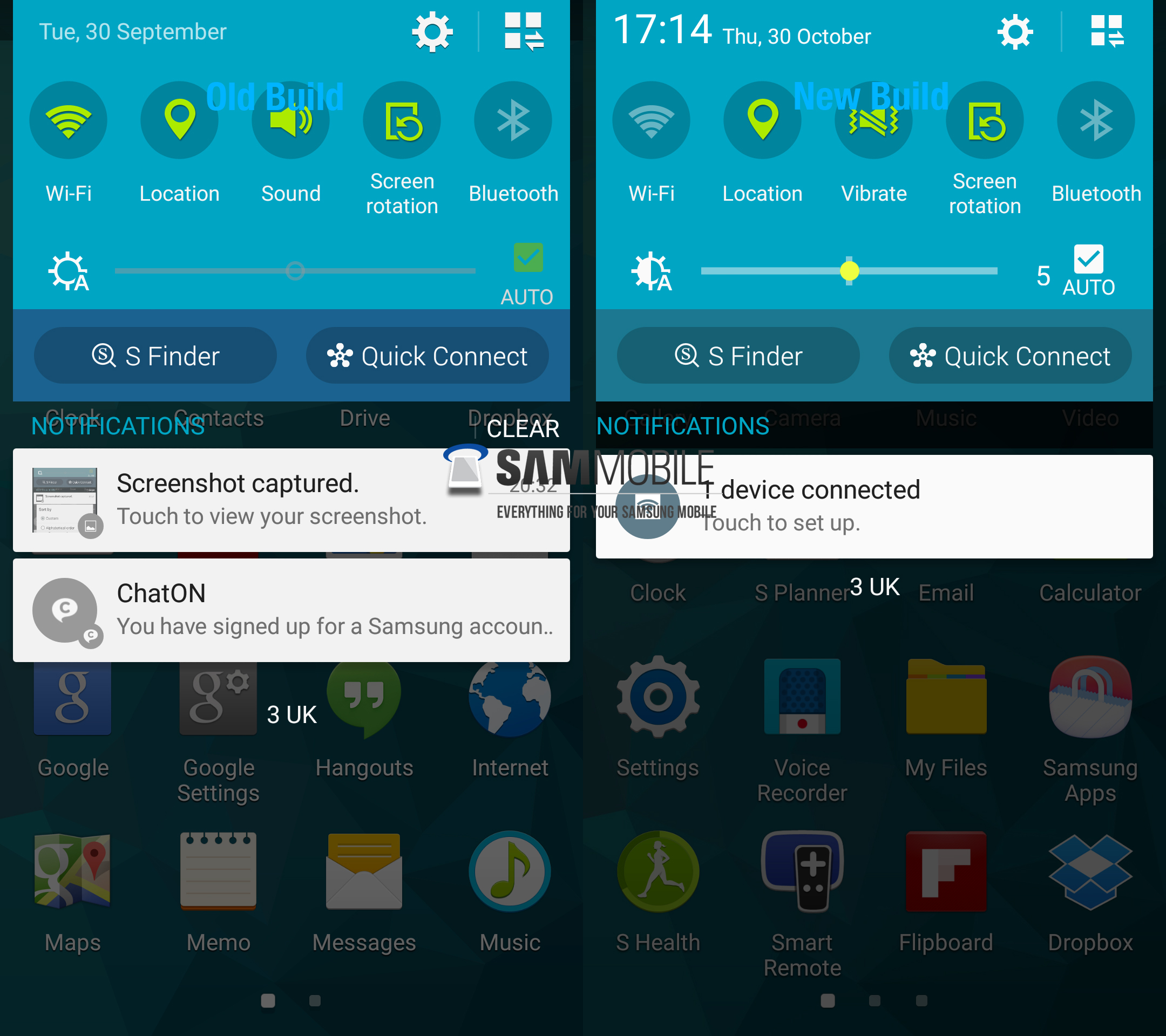
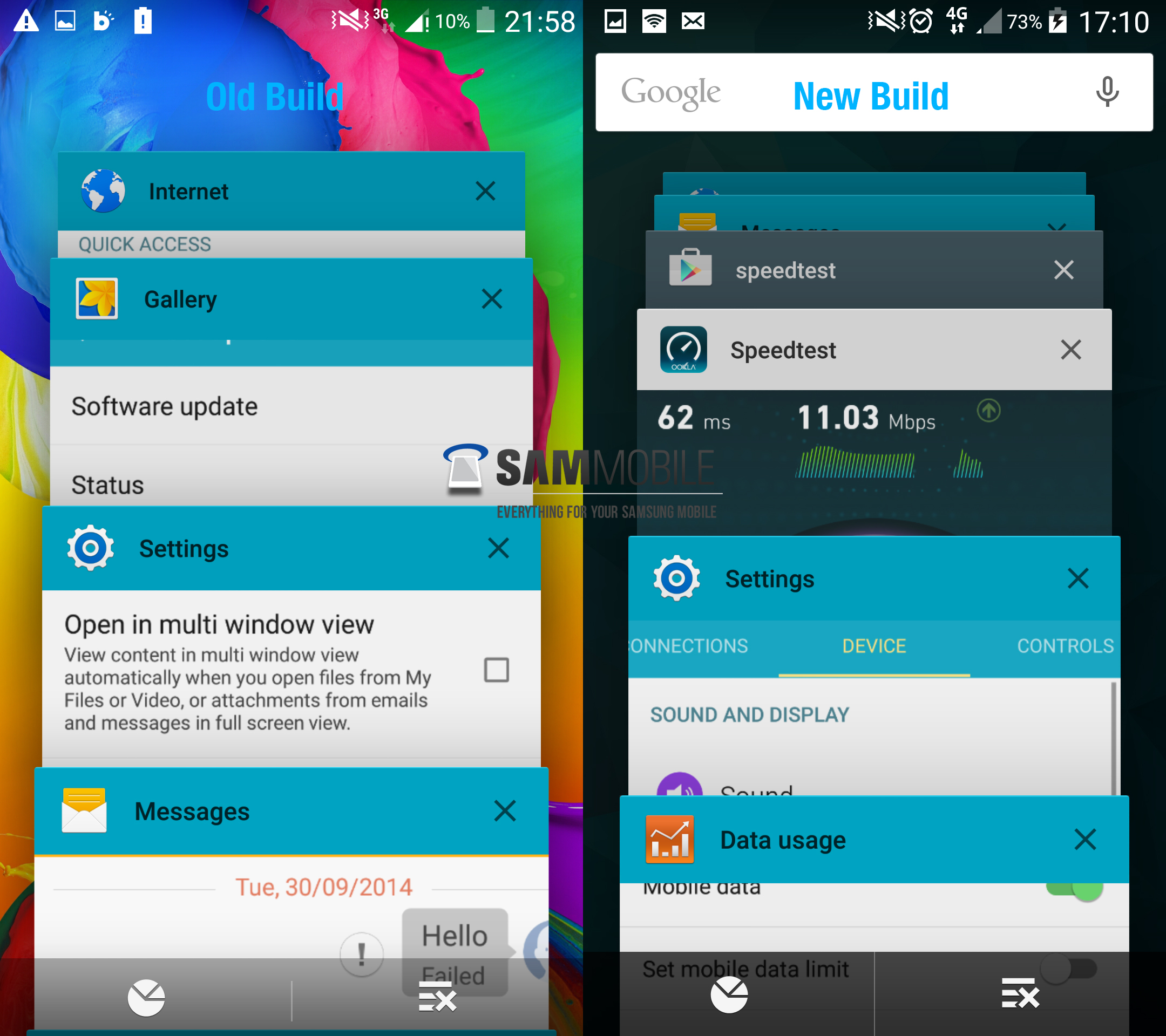
The current version of the TouchWiz running on the Galaxy S5 we found was actually much easier on the eyes and in some respects, not too far — at least in color scheme — to what Google introduced in Lollipop. The newly leaked version of Lollipopped TouchWiz shows a similar TouchWiz interface, only with small design tweaks to the Settings, Calculator, Dialer and more. Here’s whatSamMobile noticed was changed from the previous leaked Lollipop build:
New Note 4 fingerprint lock screenNew system-wide font — similar to the original one, but a tad thinner.New animations, much smoother than before — there’s a screen off animation present as well.Google Search bar in recents menuBrightness slider in notification center has a new yellow color — while changing the brightness, the notification centre disappears and allows the user to view the content beneath it.Removed “Interruptions” from Sound settingsGallery: Media can be sorted using new filters including Pets, Events, Scenery, Documents, Food, Vehicles and Flowers.Music: Improved UIClock: Navigation bar icons are now accompanied by textCalculator: Removed square grids which surrounded the numbers and symbolsContacts: New search boxStock Material Design inspired applications receive colored status barAndroid Lollipop theme’s core green elements replaced with Samsung’s blue colorSettings: Improved UI, new icon colorNew UI for setting wallpaper from home screenBetter spacing between options in power off dialog

Google’s Copresence leaked, send content directly between nearby Android and iOS devices

There have been hints that Google was working on a new service for transferring data between users in relation to their the individuals’ location. Dubbed “Copresence,” footprints of the new service have now been discovered hidden inside the latest Google Play Services update.

According to the data, it could allow for both Android and iOS devices to communicate with each other, sending miscellaneous files, pictures or other media via Bluetooth or even over WiFi — presumably WiFi direct given the 2 devices pictured below are at a bus stop.

A treasure trove of files were not only discovered inside the new Google Play Services apk (complete with introduction images), but also APIs in the Chrome Dev channel. Apparently it may not even require a Google account to login, again, a good indication that it will be cross platform. Of course, this is all opt-in (as revealed by the image file names).

Typically, when 2 people want to send each other files this is usually done by uploading files to a cloud service like Google Drive — where they’re then saved, then having the other person download said media. In an age of privacy, not everyone wants to upload media to the cloud. Using Copresence, users on iOS or Android can send files directly to one another, possibly even communicating in other ways like voice messages. Totally private and secure.

No word on when we can expect Copresence to launch, although with although the XML files and Chrome APIs suggest it could be coming really soon.

Thursday, 30 October 2014

Andy no more with google !! WHAT??

Android founder Andy Rubin is no longer working at Google!!
WHAT????
After Andy Rubin helped build the best mobile operating system the world has ever seen, it took many by surprise when he decided to leave Android last year to pursue other ventures, building robots within Google’s secretive X labs. Today, The Wall Street Journal is reporting that the Android co-founder is now leaving Google entirely, creating an “incubator” for new hardware-based startups.
It’s not really directly Android-related per se, but given Andy Rubin is the Godfather of Android, we’re sure this comes as a major blow to Google and the people who’ve worked closely with him for so many years. Google CEO Larry Page had this to say on Rubin’s departure:
“I want to wish Andy all the best with what’s next. With Android he created something truly remarkable—with a billion plus happy users. Thank you.”
According to Jessica Lessin of The Information, Rubin was looking for more freedom from his robotics unit, similar to the independent anti-aging company, Calico. Best of luck to him

Tuesday, 28 October 2014

Google fit is now out

Google fit the app which according to Google can make u fit was unleashed with the developers edition preview of android "L" Lollipop . It is an app all google /android fan boy should have in their mobile so pick ur phone up open your play store and download the app . Enjoy!!!

Sunday, 26 October 2014

[Lollipop Feature Spotlight] Long-Press Notifications For A Quick Link To Adjust That App's Notification Settings

There's nothing more annoying than an otherwise benign app that pesters you with notifications. Android has thankfully given end users the ability to completely disable notifications from pestering apps, but for developers who include more fine-grain controls in the app itself, Android 5.0 has some new options. French Android developer Cyril Mottier highlighted a new option in a detailed Google+ post: the ability to embed a link directly to an app's notifications settings within the notification itself.
notification_settings
For the sake of specificity, this new API hook allows developers to add a quick link to the notifications settings page of the app itself, not the relevant page in the Android settings menu. Users can expose this notification settings icon by long-pressing the notification of supported apps, where it will appear alongside a quick link to the app info page. This isn't helping, is it? Check out the GIF below to see what I mean.


This option isn't visible in apps by default, but adding the functionality is pretty easy for developers - if an app already has notification options that face the user, the developer only needs to add a few lines of code. Check out Mr. Mottier's post for a concise explanation, or this Android Developers page for a more technical one. (Search for INTENT_CATEGORY_NOTIFICATION_PREFFERENCES, about two thirds of the way down the page, and related entries.)

Verizon's Motorola Droid Turbo leaks its full retail form

We've already seen much of what's to come in the Verizon Motorola Droid Turbo thanks to some marketing leaks (you can see the full Droid Turbo specs as we currently know them), but this weekend we're getting one of our best looks at the upcoming phone in proper physical form thanks to Motofirmware — and in its full retail duds at that.
Along with a great look at the phone itself, we get confirmation that it'll ship with the Motorola Turbo Charger, which quickly gets a dead phone to a partial charge
Motorola Droid Turbo

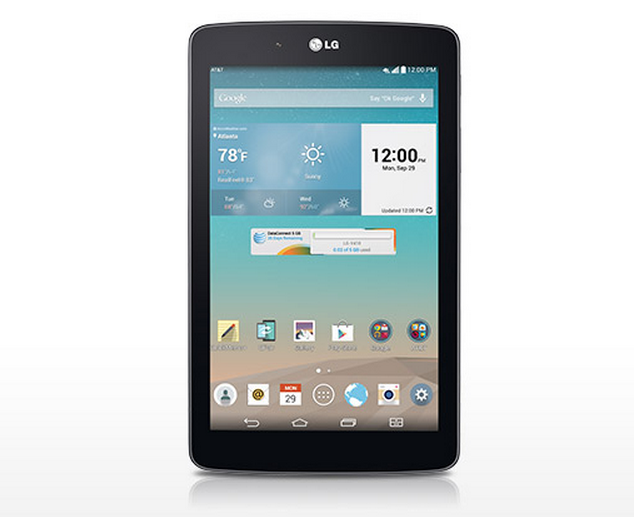
LG G Pad 7.0 LTE, LG G3 now available at US Cellular

lg g pad 7
U.S. Cellular has announced availability for the LG G Pad7.0 LTE. You’ll be able to get the data-connected tablet for $99 on a new two-year contract, and should be able to find it both in-store and online. The 7-inch tablet won’t break the charts in terms of performance, but with a 1.2GHz quad-core processor, 1GB of RAM, 1280 x 800 resolution, a 5 megapixel camera, 16GB of storage and more it should be worth its low price tag.


The LG G3 is also roaring into US Cellular’s stores today. Many of you are already quite familiar with this device (especially if you’ve read our LG G3 review), but if not here’s a quick refresher on its specs:
  • 5.5-inch 2560 x 1440 display
  • 3GB of RAM
  • 2.5GHz quad-core Snapdragon 805 chipset
  • 13 megapixel camera
  • 16GB or 32GB of internal storage
You can grab that one for $99 on a two-year contract as well, though the LG G3 is eligible for a $0 down payment to walk away with the device (so long as you agree to pay it off in equal installments over the course of a couple of years). Be sure to check both of them out over at US Cellular’s website or by stopping by your local retail location.
Continue reading:

The Nexus 6 will have tap-to-wake so you wont have to stretch for the power button

nexus 6 portrait lollipop
Earlier this week we watched as a few major news outlets got some quick hands-on time with both the Nexus 6 and Nexus 9. Because Google didn’t preemptively issue any review units prior to their official announcement, new info on these devices has continually been trickling in. A few days ago, we saw a screenshot taken from a leaked Android 5.0 Lollipop ROM and a setting called Ambient display which allows the Nexus 6 display to wake up whenever the phone was picked up, or when notifications arrive.

This option — while not present in the Android 5.0 Developer Preview — is just a regular ‘ol Lollipop software feature and not exclusive to the Nexus 6, as detailed by Google’s official Android Lollipop page. What was interesting was the under the feature section of the page, it not only mentions the ambient display mode, but tap-to-wake as well.
For those unaware, tap-to-wake is a feature found in many flagship Android devices and allows the user to double tap the display to wake it up instead of using the physical power button. While it may not sound like it, for larger devices it’s incredibly useful and will forever change the way you interact with your smartphone (and yet another helpful feature the iPhone 6 doesn’t offer).
Although never mentioned in any official capacity (or the hands-ons we’ve seen online), it seems this feature is fully present on the Nexus 6, as brought to light Wired’s Mat Honan. In his hands on, Honan specifically calls out the feature, although some were still left wondering if it could have been a misprint (the Nexus 9 also has tap-to-wake). We reached out to the author where he was able to confirm that yes, this is, in fact, a feature found in the Nexus 6 and was most certainly not posted in error. Boom.
This should finally lay the issue to rest and for tap-to-wake lovers who were afraid of losing out on this functionality for the Nexus 6 — fear not. Still up in the air is which non-Nexus Android devices will support the feature once Lollipop begins rolling out over the next few months.